


Kansas City Star | Local News
2.8330.00 Reviews
App Specs
- Version
- 11.1.16
- Updated On
- License
- Free
- Downloads
- 50,000+
- Developer
- McClatchy
- Categories
- News & Magazines
- Platform
- Android
Screenshots







 Analysis by AppCompare
I judge a local-news app by whether it helps me answer practical questions: what is changing nearby, which stories deserve my time, and whether I can read comfortably without turning every spare moment into another paid commitment. The Kansas City Star Newspaper is aimed squarely at readers who want Kansas City coverage on a phone. It is a free download from McClatchy, but that does not mean every article is free to read, so I would separate the cost of installing it from the cost of getting broader access.
What the free download does—and does not—settle
The app sits in the news and magazines category and is free to install. Its in-app purchases are listed from $7.99 to $159.99 per item, a wide span that makes it important to check the purchase screen carefully before committing. Those figures describe available purchase prices, not a promise that every reader will pay a particular amount or receive the same access. I would look at the terms shown in the app and decide whether the journalism I actually expect to read justifies the option presented there.
That distinction matters because a free app can still place some reporting behind a subscription. The download lets you try the experience, but I would not assume that installing it means unlimited access to every story. Nor would I treat the presence of paid options as proof that a subscription is worthwhile for everyone. If I only want an occasional local headline, free access may be enough; if I rely on its reporting regularly, paying could make more sense, depending on the access offered at checkout.
Where its local focus can earn a place on your phone
The strongest reason to choose this app over a broad national news reader is its Kansas City identity. A general aggregator can be useful for seeing many publishers in one feed, but it may give local developments less room or make them harder to find among national headlines. A publication-specific app is a better fit when the city and surrounding area are the reason you opened the news in the first place.
That focus is useful in an ordinary routine. I might check local coverage over breakfast, save a longer piece for a train ride, and return to a developing story later rather than trying to follow it through scattered social posts. If I am planning a weekend or trying to understand a local issue, a dedicated regional source gives me a clearer starting point than a feed built to cover everything everywhere. It is still wise to compare important claims with other reporting, especially when a story affects a decision you need to make.
One practical way to get more out of a publication app is to be selective about interruptions. If breaking alerts are available and enabled, I would keep them for developments I genuinely need to know promptly and turn down anything that makes the phone feel noisy. A notification is a pointer to a story, not the whole story; opening the article and checking its context is more useful than reacting to a headline alone.
Trade-offs to consider before relying on it
A focused newspaper app naturally has a narrower purpose than a general news service. That is a strength when you want local reporting, but a limitation if you expect one app to cover every subject, viewpoint, and region. Readers who mainly follow national or international news may be better served by a broader source, using this one only when they want a Kansas City perspective.
Worth Reading Before You Choose

EA SPORTS FC Mobile 26 Is a Bigger Football Game, but It Takes Time

Flipboard Shows What News Apps Must Do Beyond the Feed

Switching to Android Auto Means Rethinking Your Driving Routine

Google Calendar Makes a Crowded Week Easier to Manage

Ludo King Makes the Most of the Minutes Between Plans

Baby Panda World Brings Quick Play to Modern Phones, but Its Game Library Feels Busy
Paid access is another real consideration. The displayed purchase range is broad, so I would not make a decision based on the lowest figure alone or assume that it represents the total cost of the access I want. Check what a purchase includes, how long it lasts, and whether it renews before confirming. Those details are especially important if you are trying the app casually or managing several digital subscriptions.
The app has an average rating of 1.8 from 758 ratings, which is a clear reason to approach it with measured expectations rather than assuming every reader’s experience will be smooth. Ratings do not tell me which specific problem a person encountered, and they cannot predict how the app will behave on my device, but they are a useful signal to test the basics early: can I find the stories I care about, does reading feel comfortable, and does the access model make sense to me?
Who is likely to find the best value
I would recommend trying it to Kansas City residents who make a point of following local coverage and to former residents who still care about what is happening in the area. It can also suit someone who prefers reading from a single local publisher rather than piecing together updates from a search page, social network, and several unrelated outlets. The key is that local reporting should be something you will return to, not merely an occasional curiosity.
On the other hand, I would skip a paid commitment if you only open local news once in a while, need a wide range of publishers in one place, or are not comfortable with the purchase terms shown in the app. You can still install it and see whether its available reading meets your needs before deciding whether to spend anything. That is a more sensible test than subscribing on the assumption that every feature or article will automatically be useful.
For a first-time reader, I would use a short trial period of my own—not an assumed free trial—to explore the sections I care about, note how often I reach a paid prompt, and see whether the reporting answers questions I actually have. If I find myself returning for local stories several times a week, I would compare the purchase option with my budget. If I only check headlines now and then, I would keep my use light and avoid paying until there is a clear reason.
The app is rated for Everyone 10+, and it has been available since December 27, 2011. Its current version is 10.2.67, with iOS 8.0 listed as the minimum operating-system requirement. It has over 50,000 installs, which shows that readers have downloaded it, but installs alone do not tell me whether it will suit my habits. I would check device compatibility and the current purchase details before relying on it as my regular reading option.
If someone asks me whether this is a replacement for every other news app, my answer is no. I see it as a specialist choice: potentially useful for Kansas City reporting, less compelling as an all-purpose source. A news aggregator is more convenient when breadth and comparison across publishers matter most; this app is the more direct route when the local angle is the point. Keeping both approaches in mind prevents a narrow local feed from being mistaken for a complete picture.
If you’ve ever wanted to keep up with all the latest happenings in and around Kansas City without having to leave your couch, then you’ll probably want to check out the Kansas City Star Newspaper app. It’s like having the entire newsroom right in your pocket! I’ve been delving into this app, and let me tell you, it’s quite the ride. Here’s what you can expect when you download it on your Android or iOS device.
Getting Started with the App
First things first, let’s talk about getting set up. Downloading the app is a breeze. Head over to the Google Play Store or Apple App Store, search for Kansas City Star Newspaper, and hit that download button. Once it’s on your phone, you’ll need to sign in. If you’re already a subscriber, just plug in your credentials, and you’re good to go. If not, you might want to consider subscribing to unlock all the juicy content.
Interface and Usability
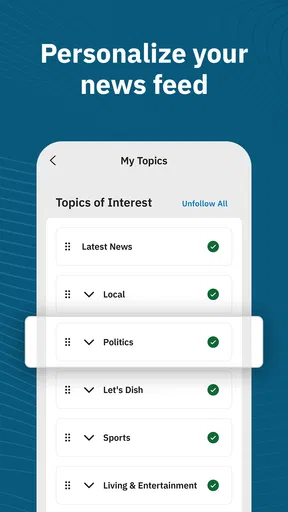
The app’s interface is clean and intuitive, which is always a plus in my book. You’re greeted with the day’s top headlines, and everything is neatly categorized so you can easily navigate through sections like Sports, Opinion, and Entertainment. I particularly like how the app allows you to customize your news feed. Want more local news and less sports? No problem! Just tweak the settings to your liking.
Scrolling through articles feels fluid, and the text is easy on the eyes. The developers have ensured that you won't be squinting at your screen, which is a relief for avid readers like me. Plus, the app is pretty snappy; I didn’t encounter any lagging or crashing during my time using it.
Features That Stand Out
Now, let’s dive into the features that really make this app shine. One of my favorites is the push notification system. It’s like having a personal news assistant that pings you whenever there’s a breaking story. This is especially handy for keeping up with local events or urgent updates.
Another noteworthy feature is the offline reading mode. You can save articles and catch up on them later, even if you’re stuck somewhere without internet. It’s perfect for those long commutes or waiting in line at the coffee shop.
Let’s not forget about the multimedia content. The app doesn’t just throw words at you; it offers a rich experience with videos and photo galleries. This multimedia approach makes stories more engaging and helps bring the news to life.
Subscription and Access
While the app is free to download, access to some of its premium content requires a subscription. Now, I know what you’re thinking: another subscription? But hear me out. For news enthusiasts, it’s worth it. You get unrestricted access to in-depth articles, analysis, and more. Plus, supporting local journalism feels good, doesn’t it?
There are a few subscription options available, so you can choose one that fits your budget. And if you’re not ready to commit, there’s a free trial to test the waters.
Final Thoughts
All in all, the Kansas City Star Newspaper app is a solid choice for anyone who wants to stay informed about what’s happening in Kansas City and beyond. It combines a user-friendly interface with rich content and handy features, making it a valuable tool for news lovers.
If you’re like me and enjoy having the latest news at your fingertips, give this app a whirl. Whether you’re a local or just have a keen interest in Kansas City, the app provides a comprehensive look at the events shaping the region. So go ahead, download it, and dive into the world of Kansas City news!
Pros
- User-friendly interface for easy navigation.
- Comprehensive local news coverage.
- Real-time updates keep you informed.
- Customizable news alerts.
- In-depth investigative journalism.
Cons
- Limited offline content access.
- Some sections have intrusive ads.
- Subscription required for full access.
- Occasional app performance issues.
- Limited international news coverage.
FAQs for Kansas City Star | Local News
What features does the Kansas City Star Newspaper app offer?
The Kansas City Star Newspaper app provides users with access to the latest news, sports updates, opinion pieces, and local events. It includes features such as breaking news alerts, personalized news feed, and offline reading. Subscribers can also access exclusive content and archived articles, enhancing the overall reading experience.
Is the Kansas City Star Newspaper app free to use?
The app can be downloaded for free on both Android and iOS devices. However, while some content is available for free, full access to all articles and features typically requires a subscription. Users can choose from various subscription plans that offer different levels of access based on their reading preferences.
How user-friendly is the Kansas City Star Newspaper app?
The app is designed with user experience in mind, featuring an intuitive and easy-to-navigate interface. Users can effortlessly browse through different sections, search for specific articles, and customize their news feed. The app also supports offline reading, allowing users to download articles to read later without an internet connection.
What kind of content can I expect from the Kansas City Star Newspaper app?
Users can expect a diverse range of content, including local and national news, sports, entertainment, lifestyle, and opinion pieces. The app covers a wide array of topics relevant to Kansas City and beyond, ensuring readers are well-informed on various issues. Subscribers also gain access to exclusive investigative journalism and in-depth reports.
Can I receive notifications from the Kansas City Star Newspaper app?
Yes, the app allows users to enable notifications for breaking news, major events, and personalized topics of interest. This feature ensures that users stay informed about important updates as they happen. Notification settings can be customized within the app to align with individual preferences, providing a tailored news experience.


